No terminal,
just run.

Visual management for the services on your Mac: status, logs and ports at a glance. You can see them, and so can your AI. Whoever starts or restarts a service, it lands on one shared timeline.

Open source · Free · No data collection
Interface demo
NoTerm
homepage-dev
Running · 2d 4h
:5173Open
api-gateway
Running · 2d 4h
:7700Open
docs-worker
Starting…
:8081Open
postgres-local
Stopped
:5432Open
tunnel-ngrok
Running · 2d 4h
:4040Open
legacy-cron
Failed to start
—Logs
Details

api-gateway :7700

CPU 12%
MEM 34%
HTTP probe · latency strips · process tree

This is what it really looks like.

Not a concept render. This is NoTerm running. Project gallery and live health check: probe latency, CPU intensity and per-process memory, one click deep.
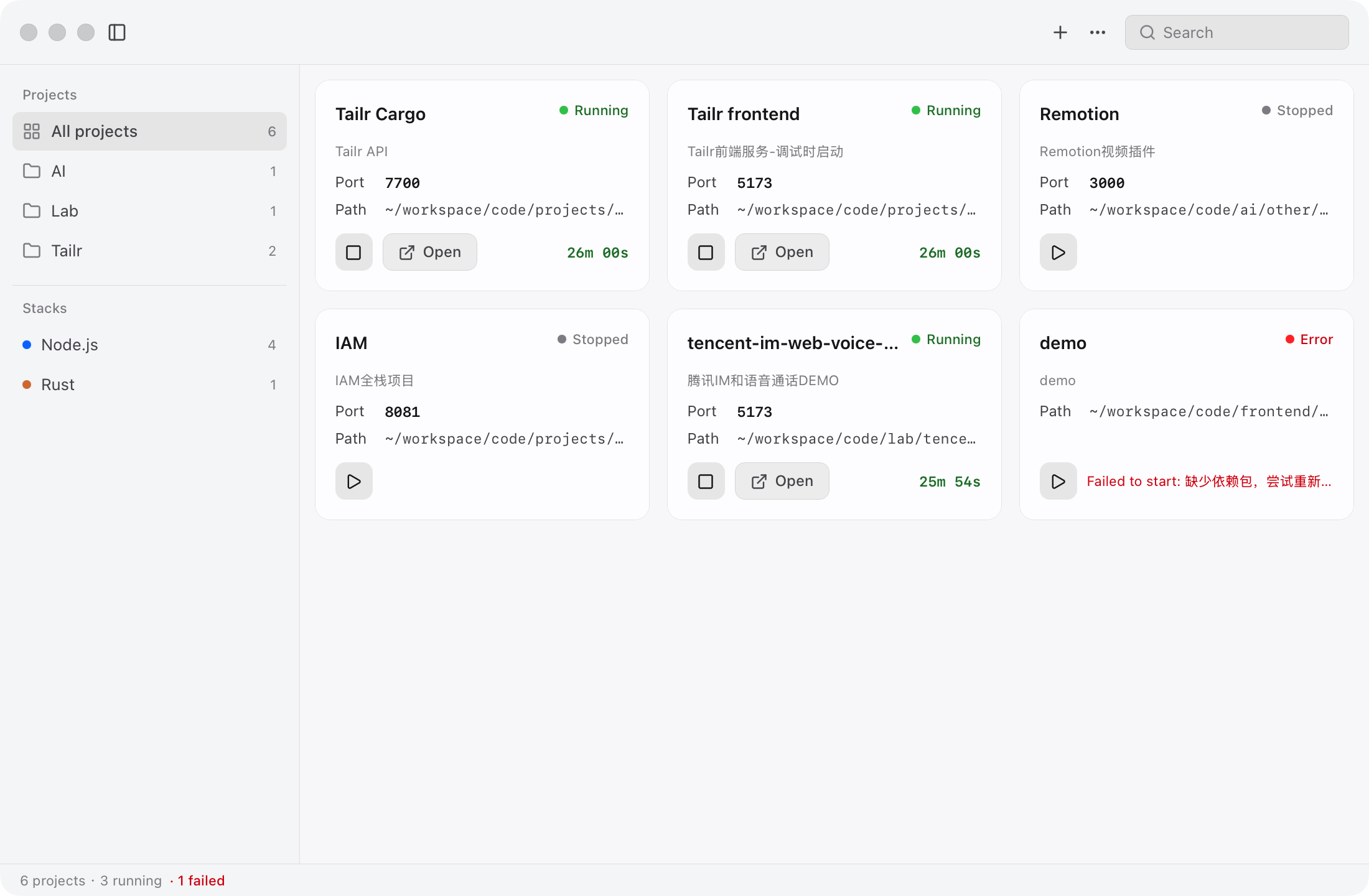
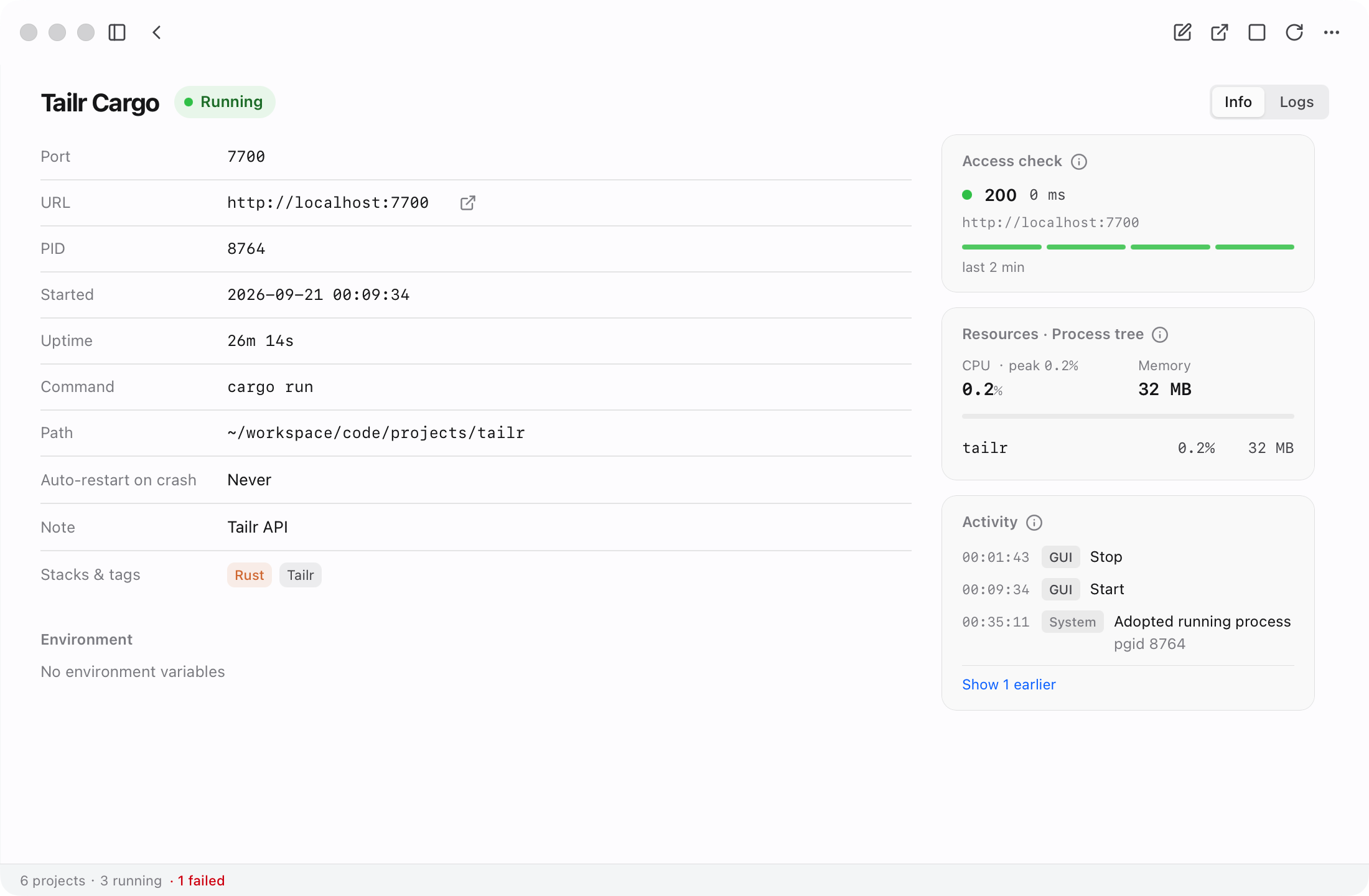
NoTerm project gallery — real screenshot
Project gallery — one card per project, plain-language status always visible, details one click away.
NoTerm live health check detail — real screenshot
Live health check — access-URL probe history, CPU intensity strips and per-process breakdown.

One card, two readings.

If terminals are not your thing, the plain-language status is enough. Need ports, PIDs and process trees? Expand the details: same data, no separate interface.

See

  • Plain-language statusRunning / Starting / Stopped / Failed, with port, path and uptime on every card.
  • Live health checkHTTP probe status, latency history strips, CPU intensity and per-process memory.
  • Activity timelineEvery action attributed to its actor: GUI / API / MCP / system.
  • Live logsFloating log panel and per-project log view with search; ANSI codes stripped.

Control

  • Start · Stop · RestartFrom the card, the detail page, the menu bar tray, or in batch.
  • Crash auto-restartPer-project policy with backoff and a circuit breaker.
  • Automatic URL detectionLearned from service logs, with port probing as fallback; manual entries are never overwritten.
  • Manifest detectionDrop in a folder; start command, stack and locked versions inferred.

Enjoy

  • Menu bar trayRunning count and per-project start/stop; closing the window keeps services alive.
  • Tags & searchGroup by tags; filter by name, command or path.
  • System notificationsKnow when a service crashes or recovers.
  • Native & accessibleVibrancy and flat native layout, honoring system accessibility settings.

One timeline for you and your AI.

The agent is not the protagonist; it is a colleague. Everything it does over MCP lands on the same timeline as your clicks, stamped the same way.

09:41:07MCPapi-gateway started (by agent via MCP)
09:41:52GUIYou clicked Open — :7700 opened in your browser
09:43:18SYSdocs-worker exited; auto-restarted per policy (attempt 1)
09:43:31APINew access URL detected: http://localhost:8081

What the agent sees is what you see — the MCP server is a thin client over the running NoTerm, never a second source of state.

An interface for AI, transparency for you.

NoTerm ships an MCP server. Your agent gets 9 tools over a local HTTP API, and every action is attributed in the timeline.

listcreateupdatestartstoprestartstatuslogsurl
  • 127.0.0.1The API binds to the loopback interface only.
  • x-noterm-tokenThe token rides a custom header; cross-site requests are rejected.
  • Copy-ready in SettingsPort, token and paste-ready snippets live in Settings.
claude mcp add noterm -- /path/to/noterm-mcp
Open sourceMIT
Freeno feature walls
Local-first127.0.0.1
No data collectionno tracking, no reporting

Now, leave the terminal to the agent.

NoTerm is still in active development; there is no downloadable release yet. Watch the repo on GitHub and be notified the day it ships.

Coming soon Build from source

Direct download lands here on release day; until then, build from source.